IDA Offering Free Women in Dentistry Webinars

HomeArticles by: adminIDA

IDA is sponsoring three webinars designed especially for women dentists. The webinars are FREE and worth 1.5 hours of CE credits. Each speaker is an accomplished, knowledgeable expert who can help improve women dentists’ personal and professional fulfillment.

Click here to learn more


ADA Creates Online Workforce Toolkit

HomeArticles by: adminIDA

The COVID-19 pandemic resulted in a voluntary reduction of the U.S. dental hygiene workforce by about 3.75%, or about 7,500 dental hygienists, according to updated research from the ADA and the American Dental Hygienists’ Association. Dental offices also report a critical shortage of assistants and office support staff. The ADA Health Policy Institute’s recent Economic Outlook and Emerging Issues in Dentistry poll shows that openings for all dental team positions are on the rise again.

In response to this issue, the ADA has created an online workforce toolkit with resources on recruiting, hiring and training a dental team. Some articles require an ADA login. Visit ADA.org/dentalstaff to access these valuable ADA resources.


ADA: Avoid the Top 10 Hiring Mistakes

HomeArticles by: adminIDA

Whether this is your first hire or you’re a seasoned veteran, hiring will always be more of an art than a science. However, there is a lot you can do to improve the chances that you hire someone likely to be successful in your practice, your culture and on your team. Do your homework to identify the ability, skill and attitude you need in your practice; be most concerned about hiring the willing personality and train the skill if necessary.

Read more from the ADA.

IDA Adds Workforce Toolkit

HomeArticles by: adminIDA

In response to the workforce shortage issues in the dental profession, the IDA has created an online Workforce Toolkit with resources for dentists in finding and retaining hygienists, assistants and office staff. We will add to the toolkit as new resources become available. Click here to view the toolkit.


Quick Finder for COVID-19 Posts

HomeArticles by: adminIDA

Updated Guidance on Masks and Patient Screening

HomeArticles by: adminIDA

State and federal guidelines regarding masking and other COVID-19 precautions have been relaxed in recent weeks in light of the greatly reduced number of COVID infections and hospitalizations. In Indiana alone, daily infections have dropped by about 97 percent from their peak two months ago, and hospitalizations are down about 85 percent from their peak in late January.

This week the IDA consulted with the Indiana State Board of Health to verify that state recommendations mirror recent changes from the CDC. The ISDH confirmed that while enhanced infection control measures are still in place in treatment areas, dentists may use their professional judgment regarding masking in the office’s public areas such as the reception room. More details are outlined below.

Screening of Patients
While never explicitly required by law, activities such as temperature checks to screen patients for COVID are now considered optional and at the dentist’s discretion. Patients who feel ill for any reason should be encouraged to reschedule routine procedures.

Masking in Non-Treatment Areas
As with pre-screening guidelines, the masking policy for non-treatment areas of your office is at your discretion as a dentist. This policy applies to both patients and staff who are working outside of treatment rooms in your facility.

PPE in Treatment Rooms
One guideline that has of course not changed is the PPE requirement for clinical staff in treatment rooms. Dentists, hygienists and assistants should continue to wear appropriate PPE in treatment areas. Anyone other than the patient in a treatment room (for example, the parent of a young child or an interpreter) should also wear a mask.

Reviewing Community Levels of Transmission
You may find it helpful to use your county’s current COVID infection rate to determine your office’s procedures on patient screenings and masks. Both the CDC and the ISDH report COVID levels on a county-wide basis, though the two calculate and update these levels somewhat differently. Links to both websites are below:


ADA Issues New Mask Guidance for Dental Offices

HomeArticles by: adminIDA

On February 25 the CDC revised its mask recommendations, indicating that indoor masks are no longer necessary for most individuals in areas with low COVID-19 community levels. The ADA has issued new resource for members to help dental practices make informed decisions with regard to these new recommendations. Click here to learn more and to download PDF mask resources. An ADA member login is required to view the PDF resources.

Healthcare settings, including dental offices, should use community transmission rates as a guide to infection control procedures, including mask requirements for patients and other members of the public. However, note that OSHA mask requirements for facilities such as hospitals and Federally Qualified Health Centers remain in effect regardless of community transmission rates. In addition, OSHA recommendations for health care professionals have not changed. The CDC recommendations apply to members of the general public only.

A basic summary of the CDC’s new recommendations is as follows:

Low COVID-19 Community Level: Masks are not required but can be worn based on personal preference or level of risk.

Medium COVID-19 Community Level : If you are immunocompromised or at high risk for severe illness, consult with your healthcare provider about strategies to lower your risk of transmission, including wearing a mask. Consider testing yourself and wearing a mask indoors if you live with or are visiting a loved one at high risk for severe illness.

High COVID-19 Community Level: Wear a well-fitting mask indoors in public settings, regardless of vaccination status or individual risk. Individuals who are immunocompromised or at risk for severe illness should wear a mask or respirator that provides greater protection.

Currently the CDC has designed most of Indiana in the Low and Medium category, with pockets of High transmission. Obviously these levels are expected to change quickly and frequently. To find your county’s current designation, visit the CDC website.


IDA Step by Step License Renewal Guide

HomeArticles by: adminIDA

[vc_row css_animation=”” row_type=”row” use_row_as_full_screen_section=”no” type=”full_width” angled_section=”no” text_align=”left” background_image_as_pattern=”without_pattern”][vc_column][vc_column_text]All Indiana dentists and hygienists must renew their licenses by March 1, 2022. The State of Indiana is encouraging all professionals to renew their licenses online instead of paper, and the online process has migrated to the Access Indiana system. In response to numerous inquiries from IDA members on the new Access Indiana process, the IDA has created this step by step guide on how to renew your license.

Before beginning this process, make sure you have the following:

  • Two of the following: Social Security number, birth date, Indiana dental license number, or registration code.
  • Documents required to explain positive response questions such as DUIs, insurance fraud, etc.
  • Access Indiana Login: If you do not have one, follow the beginning steps below to create one.

[/vc_column_text][/vc_column][/vc_row]

[vc_row css_animation=”” row_type=”row” use_row_as_full_screen_section=”no” type=”full_width” angled_section=”no” text_align=”left” background_image_as_pattern=”without_pattern”][vc_column][vc_empty_space][vc_separator type=”normal” color=”#707271″][/vc_column][/vc_row]

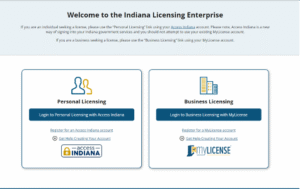
[vc_row css_animation=”” row_type=”row” use_row_as_full_screen_section=”no” type=”full_width” angled_section=”no” text_align=”left” background_image_as_pattern=”without_pattern”][vc_column][vc_column_text]To begin your renewal, visit the Indiana Licensing Enterprise website.
[/vc_column_text][vc_empty_space][/vc_column][/vc_row]

[vc_row css_animation=”” row_type=”row” use_row_as_full_screen_section=”no” type=”full_width” angled_section=”no” text_align=”left” background_image_as_pattern=”without_pattern”][vc_column][vc_column_text]
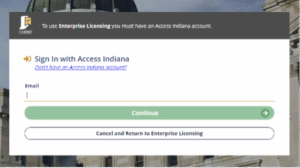
  • If you already have an Access Indiana account, click the blue Login to Personal Licensing with Access Indiana button.
  • Login in with your credentials, then go to Step 4.

[/vc_column_text][/vc_column][/vc_row]

[vc_row css_animation=”” row_type=”row” use_row_as_full_screen_section=”no” type=”full_width” angled_section=”no” text_align=”left” background_image_as_pattern=”without_pattern”][vc_column][vc_empty_space][vc_separator type=”normal” color=”#707271″][/vc_column][/vc_row]

[vc_row css_animation=”” row_type=”row” use_row_as_full_screen_section=”no” type=”full_width” angled_section=”no” text_align=”left” background_image_as_pattern=”without_pattern”][vc_column][vc_column_text][/vc_column_text][/vc_column][/vc_row]
[vc_row css_animation=”” row_type=”row” use_row_as_full_screen_section=”no” type=”full_width” angled_section=”no” text_align=”left” background_image_as_pattern=”without_pattern”][vc_column][vc_empty_space][vc_column_text]

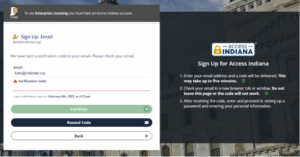
  • If you don’t have an Access Indiana account, click Don’t have an Access Indiana account?
  • Enter the email address you would like to use
  • Press Send Verification Code
  • Go to your email and find the verification code that was sent

[/vc_column_text][/vc_column][/vc_row]

[vc_row css_animation=”” row_type=”row” use_row_as_full_screen_section=”no” type=”full_width” angled_section=”no” text_align=”left” background_image_as_pattern=”without_pattern”][vc_column][vc_empty_space][vc_separator type=”normal” color=”#707271″][/vc_column][/vc_row]

[vc_row css_animation=”” row_type=”row” use_row_as_full_screen_section=”no” type=”full_width” angled_section=”no” text_align=”left” background_image_as_pattern=”without_pattern”][vc_column][vc_column_text][/vc_column_text][/vc_column][/vc_row]
[vc_row css_animation=”” row_type=”row” use_row_as_full_screen_section=”no” type=”full_width” angled_section=”no” text_align=”left” background_image_as_pattern=”without_pattern”][vc_column][vc_empty_space][/vc_column][/vc_row]


[vc_row css_animation=”” row_type=”row” use_row_as_full_screen_section=”no” type=”full_width” angled_section=”no” text_align=”left” background_image_as_pattern=”without_pattern”][vc_column][vc_column_text]

  • Enter the verification code and click continue.
  • Create a password and click continue.
  • Enter your first name, last name, and phone number
  • Click create account
  • Two-Step Verification: We recommend selecting either No, thanks or Yes, using my phone number. Click continue.
  • Recovery email: Enter your email, then click continue.

[/vc_column_text][/vc_column][/vc_row]

[vc_row css_animation=”” row_type=”row” use_row_as_full_screen_section=”no” type=”full_width” angled_section=”no” text_align=”left” background_image_as_pattern=”without_pattern”][vc_column][vc_empty_space][vc_separator type=”normal” color=”#707271″][/vc_column][/vc_row]

[vc_row css_animation=”” row_type=”row” use_row_as_full_screen_section=”no” type=”full_width” angled_section=”no” text_align=”left” background_image_as_pattern=”without_pattern”][vc_column][vc_column_text][/vc_column_text][/vc_column][/vc_row]

[vc_row css_animation=”” row_type=”row” use_row_as_full_screen_section=”no” type=”full_width” angled_section=”no” text_align=”left” background_image_as_pattern=”without_pattern”][vc_column][vc_empty_space][/vc_column][/vc_row]

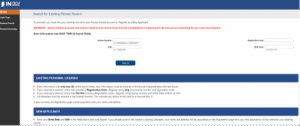
[vc_row css_animation=”” row_type=”row” use_row_as_full_screen_section=”no” type=”full_width” angled_section=”no” text_align=”left” background_image_as_pattern=”without_pattern”][vc_column][vc_column_text]You must now search for your record to link your existing license with your Access Indiana account:

  • Enter ONLY TWO: license number, Social Security number, birth date, or registration code.
  • Click search
  • Connect/link your Access Indiana to your Existing Person Record
  • Complete the Dentistry Board Questions. Obviously questions about drugs, insurance fraud, CE requirements, etc. are required. There are others that may be optional, so it is up to you if you want to enter that information.
  • Upload any documents required or positive response questions: DUI, fraud, etc.
  • Review your responses
  • Click pay fee button
  • Print your receipt

[/vc_column_text][/vc_column][/vc_row]

[vc_row css_animation=”” row_type=”row” use_row_as_full_screen_section=”no” type=”full_width” angled_section=”no” text_align=”left” background_image_as_pattern=”without_pattern”][vc_column][vc_empty_space][/vc_column][/vc_row]

[vc_row css_animation=”” row_type=”row” use_row_as_full_screen_section=”no” type=”full_width” angled_section=”no” text_align=”left” background_image_as_pattern=”without_pattern”][vc_column][vc_column_text]If you wish to print your license, the cost is $2.04. Visit the PLA’s Search Verify and Print website to obtain a printable copy of your license.[/vc_column_text][/vc_column][/vc_row]

[vc_row css_animation=”” row_type=”row” use_row_as_full_screen_section=”no” type=”full_width” angled_section=”no” text_align=”left” background_image_as_pattern=”without_pattern”][vc_column][vc_empty_space][/vc_column][/vc_row]

March 1 License Renewal Deadline

HomeArticles by: adminIDA

All Indiana dentists and hygienists must renew their licenses by March 1, 2022. The State of Indiana is encouraging all professionals to renew their licenses online instead of paper, and the online process has migrated to the Access Indiana system. If you don’t have a current Access Indiana account, you will need to create a new one. The sign up procedure also includes a verification process using a text to your cell phone or an email.

If you haven’t already renewed your license, we recommend beginning the process as soon as possible in case you need to seek account or login assistance from the state.

Helpful links:


CDC Updates Quarantine Guidelines

HomeArticles by: adminIDA

On December 23, the CDC established new guidelines for quarantine and isolation for those infected with COVID-19. The updated guidelines were initially established for health care workers, but on December 27 the CDC updated the guidelines again and said they applied to the general population. The CDC stated that the change was motivated by science demonstrating that the majority of COVID transmission occurs early in the illness, generally in the one to two days prior to onset of symptoms and the two to three days after symptoms begin.

Quarantine/Isolation Guidelines

The updated CDC guidelines are as follows:

  • People with COVID-19 should isolate for five days
  • Once asymptomatic or with symptoms resolving (without fever for 24 hours), wear a mask for five days when around others to minimize transmission of COVID


Guidelines by Vaccination Status
  • For those exposed to COVID but not yet showing symptoms: Unvaccinated individuals or those who received their second dose (or first dose of Johnson & Johnson vaccine) six months ago or longer: The CDC recommends quarantine for five days, followed by strict mask use for an additional five days.
  • If a five-day quarantine is not feasible, it is imperative that an exposed person wear a well-fitting mask at all times when around others for 10 days after exposure.
  • Fully vaccinated individuals who received their booster shot less than six months ago: There is no need to quarantine following an exposure, but these individuals should wear a mask for 10 days after the exposure.
  • For all individuals: Regardless of vaccination status, the CDC highly recommends getting tested for SARS-CoV-2 at day five after exposure. If symptoms occur, individuals should immediately quarantine until a negative test confirms symptoms are not attributable to COVID-19.

Note that news reports from the weekend suggest that the CDC may be considering additional guidelines regarding testing before an individual can exit quarantine. We will keep our members updated on any changes, if any, from the CDC.